Search

Drop Down MenusCSS Drop Down MenuPure CSS Dropdown Menu

Friday, November 17, 2023


  1. What is a partial class in C#?

    A partial class in C# allows splitting the definition of a class across multiple source files. When compiled, all parts of the partial class are combined into a single class definition.


  2. Why would you use a partial class?

    Partial classes are useful in scenarios where a class is extensive or generated by a designer. They enable separation of concerns, allowing different developers to work on different parts of the class without interfering with each other.


  3. Can a class be split into multiple partial classes across different assemblies?

    No, all parts of a partial class must be in the same assembly.


  4. How do you declare a partial class?

    To declare a partial class, use the partial keyword before the class keyword in each part of the class definition. For example:


  5. // File 1: MyClassPart1.cs partial class MyClass { // Members and methods } // File 2: MyClassPart2.cs partial class MyClass { // More members and methods }


  6. Is it possible to have methods with the same signature in different parts of a partial class?

    Yes, it's possible to have methods with the same signature in different parts of a partial class. When combined during compilation, these methods will form a single class with their implementations merged.


  7. Can you inherit from a partial class in C#?

    Yes, a partial class can be inherited from just like any other class in C#.


  8. What restrictions exist when working with partial classes?

    Some restrictions include:

  • All parts of the partial class must use the partial keyword.
  • All parts must have the same accessibility (public, private, etc.).
  • Fields, properties, methods, etc., cannot be split across multiple parts; each element must be defined in one part only.
      1. How do partial methods differ from regular methods in a partial class?

        Partial methods are declared in one part of a partial class but can have their implementation in another part. They are optional and the implementation might be present or absent. If not implemented, the compiler removes the calls to these methods.


      2. Can a partial class have multiple constructors across different parts?

        Yes, a partial class can have multiple constructors spread across different parts of the class. When combined, these constructors form a single class with all their constructors intact.


      3. What are some practical uses of partial classes in C#?

        Some common uses include separating auto-generated code from developer-written code (like with Visual Studio designer-generated code), breaking a large class into manageable sections for easier maintenance, and separating interface implementations from the main class definition.

      Tuesday, July 18, 2023

      ASP.NET MVC Interview Questions and Answers: Routing, Action Results, and Error Handling


      ASP.NET MVC Interview Questions and Answers: Routing, Action Results, and Error Handling

      What is action result in ASP.NET MVC?

      In ASP.NET MVC, an action result is a type that represents the result of an action method. It encapsulates the data that should be sent back to the client as a response. The action result can be a view, a file, a redirect, or any other type of data that needs to be returned.


      How can you specify different routing for different action methods in ASP.NET MVC?

      You can specify different routing for different action methods in ASP.NET MVC by using the `Route` attribute. This attribute can be applied to individual action methods or to the controller itself. By specifying the `Route` attribute, you can define a custom URL pattern for the action method or controller that overrides the default routing configuration.


      How do you return different action results from different action methods?

      In ASP.NET MVC, you can return different action results from different action methods by using the appropriate return type for each method. Here are some common action results and their usage:

      • `ViewResult`: Returns a view to render a webpage.
      • `RedirectResult`: Redirects the client to a different URL.
      • `JsonResult`: Returns a JSON-formatted result.
      • `FileResult`: Returns a file as the response.
      • `PartialViewResult`: Returns a partial view to render a portion of a webpage.

      You can choose the appropriate action result type based on the desired behavior of the action method.


      Can you provide an example of returning different action results from different action methods?

       Here's an example:


      In this example, the `Index` action method returns a view, `RedirectToExternal` redirects to an external URL, `GetJsonData` returns JSON data, and `DownloadFile` returns a file for download.


      How can you customize routing for different action methods in ASP.NET MVC?

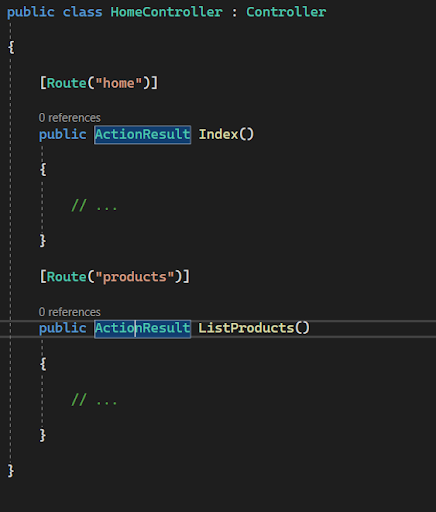
      You can customize routing for different action methods in ASP.NET MVC by specifying the `Route` attribute on each action method. Here's an example:


      In this example, the `Index` action method is accessible via the URL "/home", and the `ListProducts` action method is accessible via the URL "/products". By specifying different route patterns, you can define unique URLs for each action method.


      How can you pass parameters to different action methods in ASP.NET MVC?

      Parameters can be passed to different action methods in ASP.NET MVC through various mechanisms. The most common way is by including them in the URL as route parameters. Here's an example:


      In this example, the `Edit` action method expects an `id` parameter, which can be passed in the URL like "/home/edit/123". Similarly, the `Details` action method expects a `username` parameter, which can be passed like "/home/details/johndoe".


      How do you return a specific HTTP status code from an action method in ASP.NET MVC?

      To return a specific HTTP status code from an action method in ASP.NET MVC, you can use the `HttpStatusCodeResult` class. Here's an example:


      In this example, the `NotFound` action method returns a 404 (Not Found) status code, and the `InternalServerError` action method returns a 500 (Internal Server Error) status code.


      How can you handle different HTTP verbs (GET, POST, etc.) in different action methods?

      Different HTTP verbs can be handled in different action methods by using the `HttpPost`, `HttpGet`, `HttpPut`, `HttpDelete`, or other similar attributes on the respective action methods. Here's an example:


      In this example, the `Index` action method handles GET requests, the `Create` method handles POST requests, the `Update` method handles PUT requests, and the `Delete` method handles DELETE requests.


      How can you specify a default action method in a controller in ASP.NET MVC?

      You can specify a default action method in a controller in ASP.NET MVC by using the `Route` attribute with an empty URL pattern. Here's an example:


      In this example, the `Index` action method is set as the default action method for the `HomeController` by specifying an empty URL pattern. So when accessing "/home", it will invoke the `Index` action method.


      How can you handle a default route for unmatched URLs in ASP.NET MVC?

      To handle a default route for unmatched URLs in ASP.NET MVC, you can define a catch-all route at the end of your routing configuration. Here's an example:


      In this example, the catch-all route with the "{*url}" pattern will match any unmatched URL and route it to the "Home" controller's "Index" action method by default. This allows you to handle custom logic for unmatched URLs in a specific way.


      How can you pass data from a controller to a view in ASP.NET MVC?

      Data can be passed from a controller to a view in ASP.NET MVC by using the `ViewData`, `ViewBag`, or strongly-typed models. Here's an example of each approach:

      Using `ViewData`:


      In the corresponding view, you can access the data using `ViewData["Message"]`.

      Using `ViewBag`:


      In the corresponding view, you can access the data using `ViewBag.Message`.

      Using a strongly-typed model:


      In the corresponding view, you can access the data using the model's properties, such as `Model.Message`.


      How can you handle errors and exceptions in ASP.NET MVC?

      • Errors and exceptions in ASP.NET MVC can be handled by using various techniques, such as:
      • Global error handling: You can use the `Application_Error` event in the `Global.asax` file to handle unhandled exceptions and log the errors.
      • Custom error pages: You can configure custom error pages in the web.config file to provide a user-friendly error page for specific HTTP status codes or exception types.
      • Exception filters: You can create custom exception filters by implementing the `IExceptionFilter` interface to handle exceptions in a centralized manner across multiple action methods or controllers.
      • Try-catch blocks: You can use try-catch blocks within individual action methods to catch and handle specific exceptions locally.


      What are the differences between `Redirect` and `RedirectToAction` in ASP.NET MVC?

      The main differences between `Redirect` and `RedirectToAction` in ASP.NET MVC are as follows:

      • `Redirect`: This method is used to redirect the user to a different URL, either an internal or an external one. It sends a new HTTP request to the specified URL.
      • `RedirectToAction`: This method is used to redirect the user to another action method within the same controller or a different controller. It constructs a new URL based on the provided action method and controller, and issues a new HTTP request to that URL.
      • Essentially, `Redirect` is used for general URL redirection, while `RedirectToAction` is specifically designed for redirecting to other action methods within the MVC application.


      What is the purpose of the `ValidateAntiForgeryToken` attribute in ASP.NET MVC?

      The `ValidateAntiForgeryToken` attribute is used to protect against cross-site request forgery (CSRF) attacks in ASP.NET MVC. It ensures that a form submission originated from the same application and was not tampered with by adding a unique token to the form.

      To use the `ValidateAntiForgeryToken` attribute, you need to include a hidden input field with the anti-forgery token in your form, and the action method decorated with the attribute will validate the token automatically.


      How can you enable attribute routing in ASP.NET MVC?

      Attribute routing can be enabled in ASP.NET MVC by calling the `MapMvcAttributeRoutes` method in the `RegisterRoutes` method of the `RouteConfig` class. Here's an example:


      By enabling attribute routing, you can use the `Route` attribute on your controller and action methods to define custom URL patterns and route configurations.

      Top Interview questions and answers for .NET Core layouts and the `ActionLink` method

      What is a Layout in .NET Core?

      A Layout in .NET Core is a shared template that defines the common structure and design of multiple web pages in an application. It typically includes elements such as the HTML structure, header, footer, navigation, and other components that remain consistent across multiple pages. Views can specify a Layout to inherit from, allowing them to provide content within the defined structure.


      How do you define a Layout in a Razor View?

      To define a Layout in a Razor View, you can use the `@layout` directive at the top of the View file. For example:

       @{

             Layout = "_Layout";

         }


      What is the purpose of the `_ViewStart.cshtml` file in a .NET Core project?

      The `_ViewStart.cshtml` file is used to specify the default Layout for all Views in a .NET Core project. By setting the Layout in this file, you can avoid repeating the `@layout` directive in every individual View. It helps in maintaining consistency across the application.


      What is the `ActionLink` method in .NET Core?

      The `ActionLink` method is a built-in HTML helper in .NET Core that generates an HTML anchor tag (`<a>`) for a specified action method in a controller. It simplifies the creation of hyperlinks to other pages within the application.


      How do you use the `ActionLink` method in a Razor View?

      To use the `ActionLink` method in a Razor View, you can call it with the desired link text and route parameters. Here's an example:

         @Html.ActionLink("Home", "Index", "Home")

      This will generate an HTML anchor tag with the link text "Home" and the URL pointing to the "Index" action method in the "Home" controller.


      Can you provide an example of how to use the `ActionLink` method with route parameters?

      Here's an example of using the `ActionLink` method with route parameters:

         @Html.ActionLink("Details", "Details", "Product", new { id = 123 }, null)

      This will generate an HTML anchor tag with the link text "Details" and the URL pointing to the "Details" action method in the "Product" controller, passing the route parameter `id` with the value of 123.


      What is the purpose of the `null` parameter in the `ActionLink` method?

      The `null` parameter in the `ActionLink` method represents the HTML attributes for the anchor tag. It allows you to specify additional attributes like CSS classes, styles, or data attributes for the generated link. By passing `null`, you indicate that no additional attributes are required.


      What is the difference between a Layout and a Partial View in .NET Core?

      A Layout is a shared template that defines the common structure and design of multiple web pages in an application. It typically includes the HTML structure, header, footer, and other common elements. On the other hand, a Partial View is a reusable component that represents a portion of a web page and can be included in multiple views. Partial Views are typically used to encapsulate and reuse specific sections of the user interface.


      How can you pass HTML attributes to the `ActionLink` method in .NET Core?

      To pass HTML attributes to the `ActionLink` method, you can use an anonymous object to define the attributes and their values. For example:

      @Html.ActionLink("About", "About", "Home", null, new { @class = "nav-link", id = "about-link" })

      In this example, the `@class` and `id` attributes are added to the anchor tag generated by the `ActionLink` method.


      Can you customize the generated URL in the `ActionLink` method?

      Yes, you can customize the generated URL in the `ActionLink` method by using the `routeValues` parameter. The `routeValues` parameter is an object that represents the route parameters for the target action method. You can provide values for these parameters to construct the desired URL. For example:

        @Html.ActionLink("Edit", "Edit", "Product", new { id = Model.Id }, null)

       In this example, the `id` parameter is passed to the `Edit` action method in the `Product` controller, allowing you to generate a URL with a specific ID.


      How can you style a `ActionLink` differently based on the current page or active state?

      To style an `ActionLink` differently based on the current page or active state, you can add CSS classes or apply inline styles based on certain conditions. You can use conditional statements in your Razor View to check if the current page matches the target page and apply the appropriate styling. Alternatively, you can use JavaScript or jQuery to modify the CSS classes or styles dynamically based on the active state.


      Can you generate a `mailto:` link using the `ActionLink` method in .NET Core?

      Yes, you can generate a `mailto:` link using the `ActionLink` method by specifying the desired email address as the route value and the protocol as `mailto`. For example:

      @Html.ActionLink("Send Email", "Contact", "Home", null, new { href = "mailto:example@example.com" })

      This will generate an HTML anchor tag with the link text "Send Email" and the URL as `mailto:example@example.com`, allowing users to open their default email client with the specified email address.


      Can you generate an `ActionLink` with an HTML fragment instead of plain text?

      Yes, you can generate an `ActionLink` with an HTML fragment instead of plain text by using the `Html.Raw` method to render the HTML. For example:

      @Html.ActionLink(Html.Raw("<span class='my-class'>Home</span>"), "Index", "Home")

      This will generate an HTML anchor tag with the link text "Home" wrapped in a `<span>` element with the CSS class "my-class".


      How can you include additional query string parameters in the `ActionLink` URL?

      To include additional query string parameters in the `ActionLink` URL, you can add them as key-value pairs in the `routeValues` object. For example:

      @Html.ActionLink("Search", "Index", "Product", new { category = "electronics", page = 1 }, null)

      In this example, the `category` and `page` parameters are included as query string parameters in the generated URL.


      What is the purpose of the `fragment` parameter in the `ActionLink` method?

      The `fragment` parameter in the `ActionLink` method represents the fragment identifier or anchor within the target URL. It allows you to navigate to a specific section or element within the target page. For example:

          @Html.ActionLink("Go to Section", "Index", "Home", null, null, "section1")

      In this example, clicking the generated link will navigate to the "section1" anchor within the target page.


      How can you specify an HTTP method other than GET in the `ActionLink` method?

      The `ActionLink` method generates an HTML anchor tag, which by default performs a GET request. To specify a different HTTP method, you can use the `data-*` attributes and JavaScript/jQuery to handle the desired action. For example:

       @Html.ActionLink("Delete", "Delete", "Product", new { id = Model.Id }, new { @class = "delete-link", data_method = "delete" })

      In this example, the `data-method` attribute is set to "delete", and you can handle the action using JavaScript/jQuery to perform a DELETE request.


      How can you generate an `ActionLink` with an image instead of text?

      To generate an `ActionLink` with an image instead of text, you can use HTML and CSS to create a clickable image element within the `ActionLink`. For example:

          @Html.ActionLink("", "Index", "Home", null, new { @class = "image-link" })

      You can then apply CSS to the `image-link` class to set the background image and adjust its size and position.

      C# Interview questions and answers Data Type Variable


      What is C#?

      C# is a modern, object-oriented programming language developed by Microsoft as part of the .NET platform.


      What are the different types of variables in C#?

      • Value types: int, double, bool, char, enum, struct.
      • Reference types: string, object, class, interface.
      • Other types: var, dynamic.


      Explain the difference between value types and reference types.

      • Value types store the actual data, while reference types store references to the data.
      • Value types are stored on the stack, while reference types are stored on the heap.
      • Value types are passed by value, while reference types are passed by reference.


      What is the difference between `int` and `int?` in C#?

      • `int` is a non-nullable value type that cannot have a null value.
      • `int?` (nullable int) allows the variable to have a null value in addition to integer values.


      Explain the `var` keyword in C#.

      • `var` is an implicitly typed variable whose type is inferred by the compiler based on the assigned value.
      • It allows for cleaner code and reduces verbosity.


      What is boxing and unboxing in C#?

      • Boxing is the process of converting a value type to a reference type.
      • Unboxing is the process of converting a boxed value back to its original value type.


      What is the difference between `string` and `StringBuilder` in C#?

      • `string` is an immutable type used to represent a sequence of characters.
      • `StringBuilder` is a mutable type designed for efficient string manipulation.


      What is a constant variable in C#?

      • A constant variable is a variable whose value cannot be changed after initialization.
      • It is declared using the `const` keyword.


      What are implicit and explicit conversions in C#?

      • Implicit conversions occur automatically and do not require explicit casting.
      • Explicit conversions require explicit casting using the appropriate syntax.


      What is the purpose of the `dynamic` keyword in C#?

      • The `dynamic` keyword allows for late binding and dynamic typing in C#.
      • It defers type checking until runtime, providing more flexibility at the cost of reduced type safety.


      What is the difference between `readonly` and `const` in C#?

      • `readonly` variables can be assigned a value either at the time of declaration or within a constructor, and their value cannot be changed afterward.
      • `const` variables must be assigned a value at the time of declaration, and their value cannot be changed.


      What are nullable value types in C#?

      • Nullable value types, denoted by `type?`, allow value types to have a null value in addition to their normal range of values.
      • They are useful when a value type needs to represent the absence of a value.


      What is the difference between `is` and `as` operators in C#?

      • The `is` operator checks if an object can be cast to a specified type, returning `true` or `false`.
      • The `as` operator attempts to cast an object to a specified type, returning `null` if the cast fails instead of throwing an exception.


      Explain the concept of null-coalescing operator (`??`) in C#.

      • The null-coalescing operator provides a concise way to assign a default value when a nullable expression evaluates to `null`.
      • It returns the left-hand operand if it is not `null`, otherwise it returns the right-hand operand.


      What are the released data types in C#?

      • `decimal`: Represents decimal numbers with higher precision for financial and monetary calculations.
      • `DateTime`: Represents dates and times.
      • `TimeSpan`: Represents a duration of time.
      • `Guid`: Represents a globally unique identifier.
      • `Nullable<T>`: Represents a value type that can also be assigned a null value.


      Explain the concept of nullable value types in C#.

      • Nullable value types allow value types to have a null value in addition to their normal range of values.
      • They are useful when a value type needs to represent the absence of a value.
      • The `Nullable<T>` structure is used to create nullable value types.


      How do you declare and use an enum in C#?

      • An enum is declared using the `enum` keyword, followed by the name and a set of named constants.
      • Enums provide a way to define a set of related values, such as days of the week or status codes.
      • Enum values can be accessed using dot notation, like `EnumName.EnumValue`.


      What is the purpose of the `var` keyword in C#? How is it different from `dynamic`?

      • The `var` keyword allows the compiler to infer the type of a variable based on the assigned value.
      • It is resolved at compile-time and provides static typing.
      • In contrast, `dynamic` allows for late binding and dynamic typing, with type checking deferred until runtime.


      How do you convert between data types in C#?

      • Implicit conversions occur automatically when the conversion does not involve a data loss.
      • Explicit conversions can be done using casting or conversion methods like `Convert.ToInt32()` or `int.Parse()`.


      How do you handle null values in C#?

      • You can check for null values using the null-coalescing operator (`??`) or the null-conditional operator (`?.`).
      • You can also use conditional statements like `if (variable != null)` or null-checking methods like `IsNullOrWhiteSpace()` for strings.


      How do you format strings in C#?

      • String formatting can be done using composite formatting with `string.Format()`, interpolation with `$"..."`, or using the `String.Format()` method.
      • Additionally, you can use formatting placeholders like `{0}`, `{1}`, etc., to specify the position of arguments within the format string.


      How do you work with date and time in C#?

      • C# provides the `DateTime` struct for working with dates and times.
      • You can perform various operations like adding or subtracting time, formatting dates, comparing dates, and extracting components using properties and methods of the `DateTime` struct.


      Explain the difference between `StringBuilder` and `String` in C#.

      • `StringBuilder` is used for efficient string manipulation when there are frequent modifications to a string.
      • `StringBuilder` is mutable and provides methods like `Append()`, `Insert()`, and `Replace()` for modifying strings without creating new instances.
      • `String` is immutable, meaning that once created, it cannot be modified.

      C# commonly used variable types & Naming standards

       In C#, there are different types of variables based on their data types and storage requirements. Here are some commonly used variable types:


      Value Types:

      • `int`: Represents whole numbers.
      • `double`: Represents floating-point numbers with double precision.
      • `bool`: Represents boolean values (true or false).
      • `char`: Represents single Unicode characters.
      • `enum`: Represents a set of named values.
      • `struct`: Represents a lightweight data structure.


      Reference Types:

      • `string`: Represents a sequence of characters.
      • `object`: Represents a base type for all other types.
      • `class`: Represents a reference type with complex data structures.
      • `interface`: Represents a contract for classes to implement.


      Other Types:

      • `var`: Represents an implicitly typed variable whose type is inferred by the compiler.
      • `dynamic`: Represents a type that defers type checking until runtime.


      Naming standards for variables in C#:

      • Use meaningful and descriptive names: Choose names that accurately reflect the purpose or content of the variable. Avoid generic or ambiguous names.
      • Use camelCase: Start variable names with a lowercase letter and use camelCase for multi-word names. For example, `firstName`, `studentAge`, `employeeCount`.
      • Avoid Hungarian notation: Avoid using prefixes or encoding the variable type into its name, as it is not necessary in C#. For example, avoid prefixes like `str` for strings or `i` for integers.
      • Be consistent: Maintain consistency in naming conventions throughout your codebase. Use similar naming styles for variables of the same type or purpose.
      • Use proper casing for acronyms and abbreviations: Use PascalCase for acronyms and abbreviations that consist of two or more characters. For example, `XMLHttpRequest`, `PDFDocument`.


      C# Collections Interview Questions and Answers & Tips

      Dotnet Training in Tamil


      What is an ArrayList in C#? Provide a code snippet demonstrating its usage.

      An ArrayList is a dynamically resizable array that can store objects of any type. It is part of the `System.Collections` namespace.

      Here's a code snippet demonstrating the usage of ArrayList:


      What is a BitArray in C#? Provide an example of how it can be used.

      A BitArray in C# represents a collection of bits as a compact array of Boolean values. It provides a memory-efficient way to manipulate individual bits.

      Here's an example of how BitArray can be used:


      What is StringCollection in C#? How is it different from other collection classes?

      StringCollection in C# is a collection class specifically designed to store and manipulate a collection of string values. It is part of the `System.Collections.Specialized` namespace.

      The difference between StringCollection and other collection classes like ArrayList is that StringCollection is strongly-typed and can only store string values. It provides additional methods and events specific to string manipulation, such as Insert, Remove, IndexOf, and StringCollectionChanged.


      What is a Hashtable in C#? How does it differ from other collection classes?

      A Hashtable in C# represents a collection of key-value pairs, where each key is unique. It provides fast lookup and retrieval of values based on the associated keys using a hashing algorithm. It is part of the `System.Collections` namespace.

      The main difference between Hashtable and other collection classes like ArrayList is that Hashtable requires unique keys and allows for efficient key-based lookup. It does not preserve the order of elements. The keys and values in a Hashtable can be of any type.


      What is a SortedList in C#? How is it different from other collection classes?

      A SortedList in C# is a collection of key-value pairs that are sorted by the keys. It provides fast lookup by key and maintains the elements in a sorted order based on the keys. It is part of the `System.Collections` namespace.

      The key difference between SortedList and other collection classes is that SortedList automatically maintains the elements in a sorted order based on the keys. This allows for efficient searching and retrieval operations. However, SortedList may have slightly slower insertion and removal compared to other non-sorted collections.


      What is ListDictionary in C#? How does it differ from other dictionary classes?

      ListDictionary in C# is a simple implementation of the IDictionary interface using a singly linked list. It is part of the `System.Collections` namespace.

      ListDictionary differs from other dictionary classes like Hashtable and SortedList in terms of its implementation and performance characteristics. ListDictionary is optimized for small collections or scenarios where memory usage and performance are not critical factors. It provides dictionary-like functionality with basic operations such as Add, Remove, Contains, and accessing elements by key. However, ListDictionary does not guarantee any specific order for its elements.


      What is a HybridDictionary in C#? How does it differ from other dictionary classes?

      A HybridDictionary in C# is a dictionary class that uses a list-based implementation for small collections and a hashtable-based implementation for larger collections. It is part of the `System.Collections.Specialized` namespace.

      The main difference between HybridDictionary and other dictionary classes like Hashtable is its hybrid implementation. It dynamically switches between a list-based implementation and a hashtable-based implementation based on the number of elements in the collection. This allows for memory-efficient usage for small collections and optimized performance for larger collections.


      What is a Queue in C#? Provide an example demonstrating its usage.:

      A Queue in C# represents a first-in, first-out (FIFO) collection of objects. It is part of the `System.Collections` namespace.

      Here's an example of how Queue can be used:


      What is a Stack in C#? How does it differ from other collection classes?

      A Stack in C# represents a last-in, first-out (LIFO) collection of objects. It is part of the `System.Collections` namespace.

      The main difference between a Stack and other collection classes is that it follows the LIFO principle. Elements are added to and removed from the top of the stack. It provides operations such as Push (add an element to the top), Pop (remove and return the top element), and Peek (retrieve the top element without removing it).


      What is a HashSet in C#? Provide an example demonstrating its usage.


      A HashSet in C# is a collection class that stores unique elements in no particular order. It provides fast lookup and insertion operations based on the element's hash code. HashSet is part of the `System.Collections.Generic` namespace.

      Here's an example of how HashSet can be used:


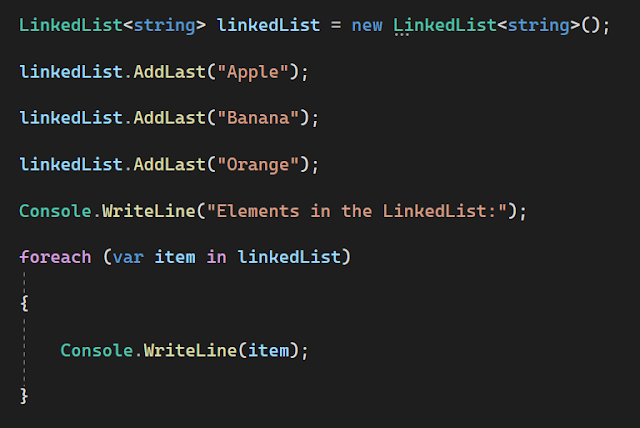
      What is a LinkedList in C#? Provide an example demonstrating its usage.

      A LinkedList in C# is a collection class that represents a doubly-linked list. It allows efficient insertion, deletion, and traversal of elements. LinkedList is part of the `System.Collections.Generic` namespace.

      Here's an example of how LinkedList can be used:


      What is a Dictionary in C#? How does it differ from other collection classes?


      A Dictionary in C# is a collection class that represents a generic key-value pair. It provides fast lookup and retrieval of values based on the associated keys. Dictionary is part of the `System.Collections.Generic` namespace.

      The main difference between a Dictionary and other collection classes like Hashtable is that Dictionary is a strongly-typed collection that ensures type safety at compile-time. It provides generic methods and avoids boxing/unboxing of values. Dictionary requires unique keys and offers efficient key-based lookup.

      Here's an example of how Dictionary can be used:


      ArrayList vs. ListDictionary:

      • ArrayList is a dynamically resizable array that stores objects, while ListDictionary is a simple implementation of IDictionary using a singly linked list.
      •  ArrayList allows storing objects of any type, while ListDictionary is specifically designed for storing key-value pairs.
      • ArrayList does not maintain any specific order for its elements, while ListDictionary stores elements in the order of insertion.


      BitArray vs. Hashtable:

      • BitArray represents a collection of bits, while Hashtable represents a collection of key-value pairs.
      • BitArray stores individual bits as Boolean values, while Hashtable stores arbitrary objects associated with unique keys.
      • BitArray is suitable for scenarios involving bit manipulation, while Hashtable is commonly used for efficient key-based lookup and retrieval.


      StringCollection vs. SortedList:

      • StringCollection is a collection specifically designed for storing and manipulating a collection of string values, while SortedList is a collection of key-value pairs sorted by the keys.
      • StringCollection is strongly-typed and can only store string values, while SortedList can store any type of object.
      • StringCollection provides additional methods and events specific to string manipulation, while SortedList offers fast key-based lookup and maintains the elements in a sorted order based on the keys.


      Hashtable vs. SortedList:

      • Hashtable represents a collection of key-value pairs, while SortedList is a collection of key-value pairs sorted by the keys.
      • Hashtable uses a hashing algorithm for fast lookup and retrieval based on keys, while SortedList maintains the elements in a sorted order based on the keys.
      • Hashtable does not preserve the order of elements, while SortedList guarantees that the elements are stored in a sorted order based on the keys.


      ListDictionary vs. HybridDictionary:

      • ListDictionary is a simple implementation of IDictionary using a singly linked list, while HybridDictionary is a dictionary that uses a list for small collections and a hashtable for larger collections.
      • ListDictionary is optimized for small collections or scenarios where memory usage and performance are not critical, while HybridDictionary dynamically switches between list-based and hashtable-based implementations based on the number of elements.
      • ListDictionary does not guarantee any specific order for its elements, while HybridDictionary provides efficient memory usage for small collections and optimized performance for larger collections.


      Queue vs. Stack:

      • Queue represents a first-in, first-out (FIFO) collection, while Stack represents a last-in, first-out (LIFO) collection.
      • Queue supports operations like Enqueue (add element to the end) and Dequeue (remove and return element from the front), while Stack supports operations like Push (add element to the top) and Pop (remove and return element from the top).
      • Queue is suitable for scenarios where order of insertion is important, while Stack is useful when you need to access the most recently added elements first.


      HashSet vs. SortedSet:

      • HashSet is an unordered collection that stores unique elements, while SortedSet is an ordered collection that stores unique elements sorted in ascending order.
      • HashSet provides fast lookup and insertion operations based on the element's hash code, while SortedSet maintains elements in a sorted order based on their natural ordering or a custom comparer.
      • HashSet is suitable when order is not important, and fast lookup and insertion are desired, while SortedSet is useful when maintaining elements in a sorted order is a requirement.


      LinkedList vs. ArrayList:

      • LinkedList is a collection that represents a doubly-linked list, while ArrayList is a dynamically resizable array.
      • LinkedList provides efficient insertion and removal operations, especially in the middle of the collection, while ArrayList offers fast random access to elements based on index.
      • LinkedList is suitable when frequent insertion or removal of elements is required, while ArrayList is useful when random access to elements by index is more important.


      Dictionary vs. Hashtable:

      • Dictionary is a generic collection that represents a key-value pair, while Hashtable is a non-generic collection that also represents a key-value pair.
      • Dictionary ensures type safety at compile-time, while Hashtable requires boxing/unboxing of values.
      • Dictionary is faster and more efficient due to its generic nature, while Hashtable is slower and less efficient due to boxing/unboxing and lack of type safety.


      SortedList vs. SortedDictionary:

      • SortedList is a collection of key-value pairs sorted by keys, while SortedDictionary is a generic collection of key-value pairs sorted by keys.
      • SortedList uses an internal array to store elements, while SortedDictionary uses a binary search tree.
      • SortedList provides efficient key-based lookup and is useful when both key-based lookup and index-based retrieval are required, while SortedDictionary offers faster insertion and removal operations.


      More Questions

      Best Dotnet Training in Tamil

      Best Dotnet Training in Tamil