Search

Drop Down MenusCSS Drop Down MenuPure CSS Dropdown Menu
Showing posts with label C#. Show all posts

Tuesday, July 18, 2023

Top Interview questions and answers for .NET Core layouts and the `ActionLink` method

What is a Layout in .NET Core?

A Layout in .NET Core is a shared template that defines the common structure and design of multiple web pages in an application. It typically includes elements such as the HTML structure, header, footer, navigation, and other components that remain consistent across multiple pages. Views can specify a Layout to inherit from, allowing them to provide content within the defined structure.


How do you define a Layout in a Razor View?

To define a Layout in a Razor View, you can use the `@layout` directive at the top of the View file. For example:

 @{

       Layout = "_Layout";

   }


What is the purpose of the `_ViewStart.cshtml` file in a .NET Core project?

The `_ViewStart.cshtml` file is used to specify the default Layout for all Views in a .NET Core project. By setting the Layout in this file, you can avoid repeating the `@layout` directive in every individual View. It helps in maintaining consistency across the application.


What is the `ActionLink` method in .NET Core?

The `ActionLink` method is a built-in HTML helper in .NET Core that generates an HTML anchor tag (`<a>`) for a specified action method in a controller. It simplifies the creation of hyperlinks to other pages within the application.


How do you use the `ActionLink` method in a Razor View?

To use the `ActionLink` method in a Razor View, you can call it with the desired link text and route parameters. Here's an example:

   @Html.ActionLink("Home", "Index", "Home")

This will generate an HTML anchor tag with the link text "Home" and the URL pointing to the "Index" action method in the "Home" controller.


Can you provide an example of how to use the `ActionLink` method with route parameters?

Here's an example of using the `ActionLink` method with route parameters:

   @Html.ActionLink("Details", "Details", "Product", new { id = 123 }, null)

This will generate an HTML anchor tag with the link text "Details" and the URL pointing to the "Details" action method in the "Product" controller, passing the route parameter `id` with the value of 123.


What is the purpose of the `null` parameter in the `ActionLink` method?

The `null` parameter in the `ActionLink` method represents the HTML attributes for the anchor tag. It allows you to specify additional attributes like CSS classes, styles, or data attributes for the generated link. By passing `null`, you indicate that no additional attributes are required.


What is the difference between a Layout and a Partial View in .NET Core?

A Layout is a shared template that defines the common structure and design of multiple web pages in an application. It typically includes the HTML structure, header, footer, and other common elements. On the other hand, a Partial View is a reusable component that represents a portion of a web page and can be included in multiple views. Partial Views are typically used to encapsulate and reuse specific sections of the user interface.


How can you pass HTML attributes to the `ActionLink` method in .NET Core?

To pass HTML attributes to the `ActionLink` method, you can use an anonymous object to define the attributes and their values. For example:

@Html.ActionLink("About", "About", "Home", null, new { @class = "nav-link", id = "about-link" })

In this example, the `@class` and `id` attributes are added to the anchor tag generated by the `ActionLink` method.


Can you customize the generated URL in the `ActionLink` method?

Yes, you can customize the generated URL in the `ActionLink` method by using the `routeValues` parameter. The `routeValues` parameter is an object that represents the route parameters for the target action method. You can provide values for these parameters to construct the desired URL. For example:

  @Html.ActionLink("Edit", "Edit", "Product", new { id = Model.Id }, null)

 In this example, the `id` parameter is passed to the `Edit` action method in the `Product` controller, allowing you to generate a URL with a specific ID.


How can you style a `ActionLink` differently based on the current page or active state?

To style an `ActionLink` differently based on the current page or active state, you can add CSS classes or apply inline styles based on certain conditions. You can use conditional statements in your Razor View to check if the current page matches the target page and apply the appropriate styling. Alternatively, you can use JavaScript or jQuery to modify the CSS classes or styles dynamically based on the active state.


Can you generate a `mailto:` link using the `ActionLink` method in .NET Core?

Yes, you can generate a `mailto:` link using the `ActionLink` method by specifying the desired email address as the route value and the protocol as `mailto`. For example:

@Html.ActionLink("Send Email", "Contact", "Home", null, new { href = "mailto:example@example.com" })

This will generate an HTML anchor tag with the link text "Send Email" and the URL as `mailto:example@example.com`, allowing users to open their default email client with the specified email address.


Can you generate an `ActionLink` with an HTML fragment instead of plain text?

Yes, you can generate an `ActionLink` with an HTML fragment instead of plain text by using the `Html.Raw` method to render the HTML. For example:

@Html.ActionLink(Html.Raw("<span class='my-class'>Home</span>"), "Index", "Home")

This will generate an HTML anchor tag with the link text "Home" wrapped in a `<span>` element with the CSS class "my-class".


How can you include additional query string parameters in the `ActionLink` URL?

To include additional query string parameters in the `ActionLink` URL, you can add them as key-value pairs in the `routeValues` object. For example:

@Html.ActionLink("Search", "Index", "Product", new { category = "electronics", page = 1 }, null)

In this example, the `category` and `page` parameters are included as query string parameters in the generated URL.


What is the purpose of the `fragment` parameter in the `ActionLink` method?

The `fragment` parameter in the `ActionLink` method represents the fragment identifier or anchor within the target URL. It allows you to navigate to a specific section or element within the target page. For example:

    @Html.ActionLink("Go to Section", "Index", "Home", null, null, "section1")

In this example, clicking the generated link will navigate to the "section1" anchor within the target page.


How can you specify an HTTP method other than GET in the `ActionLink` method?

The `ActionLink` method generates an HTML anchor tag, which by default performs a GET request. To specify a different HTTP method, you can use the `data-*` attributes and JavaScript/jQuery to handle the desired action. For example:

 @Html.ActionLink("Delete", "Delete", "Product", new { id = Model.Id }, new { @class = "delete-link", data_method = "delete" })

In this example, the `data-method` attribute is set to "delete", and you can handle the action using JavaScript/jQuery to perform a DELETE request.


How can you generate an `ActionLink` with an image instead of text?

To generate an `ActionLink` with an image instead of text, you can use HTML and CSS to create a clickable image element within the `ActionLink`. For example:

    @Html.ActionLink("", "Index", "Home", null, new { @class = "image-link" })

You can then apply CSS to the `image-link` class to set the background image and adjust its size and position.

C# commonly used variable types & Naming standards

 In C#, there are different types of variables based on their data types and storage requirements. Here are some commonly used variable types:


Value Types:

  • `int`: Represents whole numbers.
  • `double`: Represents floating-point numbers with double precision.
  • `bool`: Represents boolean values (true or false).
  • `char`: Represents single Unicode characters.
  • `enum`: Represents a set of named values.
  • `struct`: Represents a lightweight data structure.


Reference Types:

  • `string`: Represents a sequence of characters.
  • `object`: Represents a base type for all other types.
  • `class`: Represents a reference type with complex data structures.
  • `interface`: Represents a contract for classes to implement.


Other Types:

  • `var`: Represents an implicitly typed variable whose type is inferred by the compiler.
  • `dynamic`: Represents a type that defers type checking until runtime.


Naming standards for variables in C#:

  • Use meaningful and descriptive names: Choose names that accurately reflect the purpose or content of the variable. Avoid generic or ambiguous names.
  • Use camelCase: Start variable names with a lowercase letter and use camelCase for multi-word names. For example, `firstName`, `studentAge`, `employeeCount`.
  • Avoid Hungarian notation: Avoid using prefixes or encoding the variable type into its name, as it is not necessary in C#. For example, avoid prefixes like `str` for strings or `i` for integers.
  • Be consistent: Maintain consistency in naming conventions throughout your codebase. Use similar naming styles for variables of the same type or purpose.
  • Use proper casing for acronyms and abbreviations: Use PascalCase for acronyms and abbreviations that consist of two or more characters. For example, `XMLHttpRequest`, `PDFDocument`.


C# Collections Interview Questions and Answers & Tips

Dotnet Training in Tamil


What is an ArrayList in C#? Provide a code snippet demonstrating its usage.

An ArrayList is a dynamically resizable array that can store objects of any type. It is part of the `System.Collections` namespace.

Here's a code snippet demonstrating the usage of ArrayList:


What is a BitArray in C#? Provide an example of how it can be used.

A BitArray in C# represents a collection of bits as a compact array of Boolean values. It provides a memory-efficient way to manipulate individual bits.

Here's an example of how BitArray can be used:


What is StringCollection in C#? How is it different from other collection classes?

StringCollection in C# is a collection class specifically designed to store and manipulate a collection of string values. It is part of the `System.Collections.Specialized` namespace.

The difference between StringCollection and other collection classes like ArrayList is that StringCollection is strongly-typed and can only store string values. It provides additional methods and events specific to string manipulation, such as Insert, Remove, IndexOf, and StringCollectionChanged.


What is a Hashtable in C#? How does it differ from other collection classes?

A Hashtable in C# represents a collection of key-value pairs, where each key is unique. It provides fast lookup and retrieval of values based on the associated keys using a hashing algorithm. It is part of the `System.Collections` namespace.

The main difference between Hashtable and other collection classes like ArrayList is that Hashtable requires unique keys and allows for efficient key-based lookup. It does not preserve the order of elements. The keys and values in a Hashtable can be of any type.


What is a SortedList in C#? How is it different from other collection classes?

A SortedList in C# is a collection of key-value pairs that are sorted by the keys. It provides fast lookup by key and maintains the elements in a sorted order based on the keys. It is part of the `System.Collections` namespace.

The key difference between SortedList and other collection classes is that SortedList automatically maintains the elements in a sorted order based on the keys. This allows for efficient searching and retrieval operations. However, SortedList may have slightly slower insertion and removal compared to other non-sorted collections.


What is ListDictionary in C#? How does it differ from other dictionary classes?

ListDictionary in C# is a simple implementation of the IDictionary interface using a singly linked list. It is part of the `System.Collections` namespace.

ListDictionary differs from other dictionary classes like Hashtable and SortedList in terms of its implementation and performance characteristics. ListDictionary is optimized for small collections or scenarios where memory usage and performance are not critical factors. It provides dictionary-like functionality with basic operations such as Add, Remove, Contains, and accessing elements by key. However, ListDictionary does not guarantee any specific order for its elements.


What is a HybridDictionary in C#? How does it differ from other dictionary classes?

A HybridDictionary in C# is a dictionary class that uses a list-based implementation for small collections and a hashtable-based implementation for larger collections. It is part of the `System.Collections.Specialized` namespace.

The main difference between HybridDictionary and other dictionary classes like Hashtable is its hybrid implementation. It dynamically switches between a list-based implementation and a hashtable-based implementation based on the number of elements in the collection. This allows for memory-efficient usage for small collections and optimized performance for larger collections.


What is a Queue in C#? Provide an example demonstrating its usage.:

A Queue in C# represents a first-in, first-out (FIFO) collection of objects. It is part of the `System.Collections` namespace.

Here's an example of how Queue can be used:


What is a Stack in C#? How does it differ from other collection classes?

A Stack in C# represents a last-in, first-out (LIFO) collection of objects. It is part of the `System.Collections` namespace.

The main difference between a Stack and other collection classes is that it follows the LIFO principle. Elements are added to and removed from the top of the stack. It provides operations such as Push (add an element to the top), Pop (remove and return the top element), and Peek (retrieve the top element without removing it).


What is a HashSet in C#? Provide an example demonstrating its usage.


A HashSet in C# is a collection class that stores unique elements in no particular order. It provides fast lookup and insertion operations based on the element's hash code. HashSet is part of the `System.Collections.Generic` namespace.

Here's an example of how HashSet can be used:


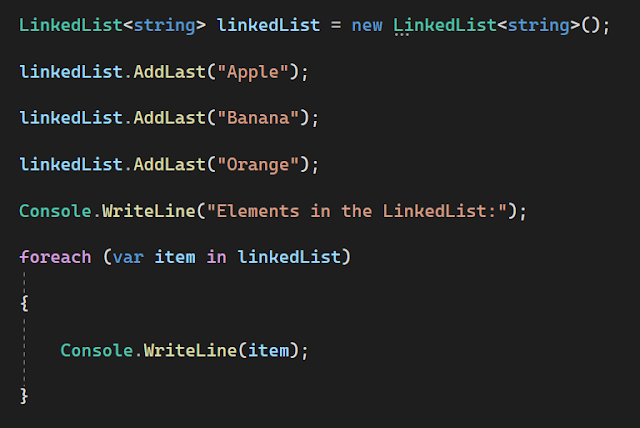
What is a LinkedList in C#? Provide an example demonstrating its usage.

A LinkedList in C# is a collection class that represents a doubly-linked list. It allows efficient insertion, deletion, and traversal of elements. LinkedList is part of the `System.Collections.Generic` namespace.

Here's an example of how LinkedList can be used:


What is a Dictionary in C#? How does it differ from other collection classes?


A Dictionary in C# is a collection class that represents a generic key-value pair. It provides fast lookup and retrieval of values based on the associated keys. Dictionary is part of the `System.Collections.Generic` namespace.

The main difference between a Dictionary and other collection classes like Hashtable is that Dictionary is a strongly-typed collection that ensures type safety at compile-time. It provides generic methods and avoids boxing/unboxing of values. Dictionary requires unique keys and offers efficient key-based lookup.

Here's an example of how Dictionary can be used:


ArrayList vs. ListDictionary:

  • ArrayList is a dynamically resizable array that stores objects, while ListDictionary is a simple implementation of IDictionary using a singly linked list.
  •  ArrayList allows storing objects of any type, while ListDictionary is specifically designed for storing key-value pairs.
  • ArrayList does not maintain any specific order for its elements, while ListDictionary stores elements in the order of insertion.


BitArray vs. Hashtable:

  • BitArray represents a collection of bits, while Hashtable represents a collection of key-value pairs.
  • BitArray stores individual bits as Boolean values, while Hashtable stores arbitrary objects associated with unique keys.
  • BitArray is suitable for scenarios involving bit manipulation, while Hashtable is commonly used for efficient key-based lookup and retrieval.


StringCollection vs. SortedList:

  • StringCollection is a collection specifically designed for storing and manipulating a collection of string values, while SortedList is a collection of key-value pairs sorted by the keys.
  • StringCollection is strongly-typed and can only store string values, while SortedList can store any type of object.
  • StringCollection provides additional methods and events specific to string manipulation, while SortedList offers fast key-based lookup and maintains the elements in a sorted order based on the keys.


Hashtable vs. SortedList:

  • Hashtable represents a collection of key-value pairs, while SortedList is a collection of key-value pairs sorted by the keys.
  • Hashtable uses a hashing algorithm for fast lookup and retrieval based on keys, while SortedList maintains the elements in a sorted order based on the keys.
  • Hashtable does not preserve the order of elements, while SortedList guarantees that the elements are stored in a sorted order based on the keys.


ListDictionary vs. HybridDictionary:

  • ListDictionary is a simple implementation of IDictionary using a singly linked list, while HybridDictionary is a dictionary that uses a list for small collections and a hashtable for larger collections.
  • ListDictionary is optimized for small collections or scenarios where memory usage and performance are not critical, while HybridDictionary dynamically switches between list-based and hashtable-based implementations based on the number of elements.
  • ListDictionary does not guarantee any specific order for its elements, while HybridDictionary provides efficient memory usage for small collections and optimized performance for larger collections.


Queue vs. Stack:

  • Queue represents a first-in, first-out (FIFO) collection, while Stack represents a last-in, first-out (LIFO) collection.
  • Queue supports operations like Enqueue (add element to the end) and Dequeue (remove and return element from the front), while Stack supports operations like Push (add element to the top) and Pop (remove and return element from the top).
  • Queue is suitable for scenarios where order of insertion is important, while Stack is useful when you need to access the most recently added elements first.


HashSet vs. SortedSet:

  • HashSet is an unordered collection that stores unique elements, while SortedSet is an ordered collection that stores unique elements sorted in ascending order.
  • HashSet provides fast lookup and insertion operations based on the element's hash code, while SortedSet maintains elements in a sorted order based on their natural ordering or a custom comparer.
  • HashSet is suitable when order is not important, and fast lookup and insertion are desired, while SortedSet is useful when maintaining elements in a sorted order is a requirement.


LinkedList vs. ArrayList:

  • LinkedList is a collection that represents a doubly-linked list, while ArrayList is a dynamically resizable array.
  • LinkedList provides efficient insertion and removal operations, especially in the middle of the collection, while ArrayList offers fast random access to elements based on index.
  • LinkedList is suitable when frequent insertion or removal of elements is required, while ArrayList is useful when random access to elements by index is more important.


Dictionary vs. Hashtable:

  • Dictionary is a generic collection that represents a key-value pair, while Hashtable is a non-generic collection that also represents a key-value pair.
  • Dictionary ensures type safety at compile-time, while Hashtable requires boxing/unboxing of values.
  • Dictionary is faster and more efficient due to its generic nature, while Hashtable is slower and less efficient due to boxing/unboxing and lack of type safety.


SortedList vs. SortedDictionary:

  • SortedList is a collection of key-value pairs sorted by keys, while SortedDictionary is a generic collection of key-value pairs sorted by keys.
  • SortedList uses an internal array to store elements, while SortedDictionary uses a binary search tree.
  • SortedList provides efficient key-based lookup and is useful when both key-based lookup and index-based retrieval are required, while SortedDictionary offers faster insertion and removal operations.


More Questions

Best Dotnet Training in Tamil

Best Dotnet Training in Tamil


C# Collection Best practices and tips to keep in mind

Dotnet Training in Tamil

Best practices and tips to keep in mind:

Use the appropriate collection type: Choose the collection type that best suits your needs based on the specific requirements of your application. For example, use ArrayList for a dynamically resizable array, Hashtable for a collection of key-value pairs, or LinkedList for efficient insertion and removal operations.


Specify the collection type explicitly: When declaring and working with non-generic collections, it's a good practice to explicitly specify the collection type. For example, instead of using the non-generic `ArrayList`, use the generic `List<T>` with the appropriate type parameter.


Avoid mixing types in collections: Non-generic collections like ArrayList allow storing elements of different types. However, it's generally recommended to avoid mixing types within a collection to maintain type safety and clarity in your code.


Use the appropriate methods and properties: Each non-generic collection provides specific methods and properties tailored to its functionality. Familiarize yourself with the available methods and use them appropriately. For example, use `Add` to add elements, `Remove` to remove elements, and `Count` to get the number of elements.


Be cautious of boxing and unboxing: Non-generic collections store elements as objects, which can lead to boxing and unboxing operations when working with value types. Be aware of the performance implications of boxing and unboxing, and consider using generic collections when working with value types to avoid these operations.


Prefer generic collections when possible: Whenever possible, use the generic versions of collections (such as `List<T>`, `Dictionary<TKey, TValue>`, etc.) instead of their non-generic counterparts. Generic collections provide better type safety, improved performance, and avoid the need for casting or boxing/unboxing.


Consider using collection initializers: Collection initializers provide a concise syntax for initializing collection objects with a set of elements. Take advantage of collection initializers to simplify the code when adding elements to non-generic collections.


Ensure thread safety if required: Non-generic collections are not inherently thread-safe. If you need to access a collection from multiple threads concurrently, consider using thread-safe techniques like locking or using concurrent collections (available in the `System.Collections.Concurrent` namespace).


Dispose of IDisposable collections: Some non-generic collections, such as `Hashtable`, may implement the `IDisposable` interface. If you use such collections and they are no longer needed, make sure to dispose of them properly to release any resources they may hold.


Follow naming conventions: When naming your collection variables or types, follow the naming conventions recommended by the C# programming guidelines. Use meaningful and descriptive names to enhance code readability and maintainability.

By following these best practices and tips, you can effectively work with non-generic collections in C# and write clean, maintainable code. However, it's generally recommended to use generic collections whenever possible to take advantage of their type safety, improved performance, and better code readability.


Naming conventions for collections

Use plural names: Use plural names for collection variables to indicate that they represent multiple elements. For example, use `customers` instead of `customer` for a collection of customer objects.


Use descriptive names: Choose meaningful and descriptive names that accurately represent the purpose or content of the collection. Avoid using generic names like `list` or `collection` unless they are appropriate in the context.


Avoid type-specific names: Avoid including the type name in the collection variable name. For example, instead of naming a collection of strings as `stringList`, simply use `names` or a more descriptive name related to the specific purpose of the collection.


Prefer specific collection names: If possible, use more specific collection names that indicate the purpose or usage of the collection. For example, use `orderItems` instead of `items` if the collection represents order items.


Use camelCase: Use camelCase for naming collection variables, starting with a lowercase letter. For example, use `userList` instead of `UserList` or `user_list`.


Avoid Hungarian notation: Avoid using Hungarian notation or prefixes to indicate the collection type, such as `lst`, `arr`, or `dict`. The type information should be clear from the variable declaration and context.


Be consistent: Maintain consistency in naming conventions throughout your codebase. If you follow a specific naming convention for collections, stick to it consistently across your code.


More Questions

Best Dotnet Training in Tamil

Best Dotnet Training in Tamil


Monday, July 10, 2023

Interview questions and answers related to ASP.NET Core, Razor views, controllers, layouts, and C# code within HTML

Interview questions and answers related to ASP.NET Core, Razor views, controllers, layouts, and C# code within HTML:


What is ASP.NET Core?

ASP.NET Core is an open-source, cross-platform framework for building modern web applications. It enables developers to create web applications and services that can run on Windows, macOS, or Linux.


What is Razor view in ASP.NET Core?

Razor view is a markup syntax used to combine server-side C# code with HTML to generate dynamic web pages. Razor views allow developers to write clean and readable code by seamlessly integrating C# code within HTML markup.


What is a controller in ASP.NET Core?

A controller in ASP.NET Core is responsible for handling incoming HTTP requests and generating appropriate responses. It processes user actions, interacts with models and databases, and returns views or data to the client.


What is a layout in Razor views?

A layout in Razor views provides a consistent structure and design for multiple views. It defines the common HTML elements, such as header, footer, navigation, etc., that are shared across different pages. Layouts allow developers to maintain a consistent user interface throughout the application.


How do you pass data from a controller to a view?

Data can be passed from a controller to a view in ASP.NET Core using the ViewBag, ViewData, or strongly-typed models. ViewBag and ViewData are dynamic objects that allow you to store and retrieve data, while strongly-typed models provide a type-safe approach by defining model classes and passing them to views.


How do you create a new Razor view in ASP.NET Core?

To create a new Razor view, you can right-click on the desired folder in Visual Studio or your preferred code editor, select "Add," and then choose "View." Specify the view name, select the desired template (empty, list, create, etc.), and click "Add."


How can you use C# code within HTML markup in Razor views?

You can use C# code within HTML markup in Razor views by enclosing the code within `@{ }` or by using the `@` symbol for inline expressions. For example:


What is the purpose of the @model directive in Razor views?

The `@model` directive in Razor views is used to specify the type of the model being passed to the view. It allows you to use strongly-typed models within the view, providing IntelliSense support and compile-time type checking.


How do you create a new controller in ASP.NET Core?

To create a new controller in ASP.NET Core, right-click on the desired folder in Visual Studio or your preferred code editor, select "Add," and then choose "Controller." Specify the controller name, select the desired template (empty, API, etc.), and click "Add."


How do you specify a layout for a Razor view?

To specify a layout for a Razor view, you can use the `@layout` directive at the top of the view file. For example:


This specifies the layout file `_Layout.cshtml` located in the `Views/Shared` folder.

These questions cover some fundamental concepts of ASP.NET Core, Razor views, controllers, layouts, and using C# code within HTML. It's always a good idea to study further and explore additional resources to deepen your understanding of these topics.


What is a Layout in Razor Views?

 A Layout in Razor Views is a shared template that defines the common structure and design of multiple web pages in an application. It contains the common HTML structure, header, footer, and other elements that remain consistent across multiple pages. Views can specify a Layout to inherit from, allowing them to provide content within the defined structure.


How can you pass data from a Controller to a View in ASP.NET Core?

Data can be passed from a Controller to a View in ASP.NET Core using ViewBag, ViewData, or strongly-typed models. ViewBag and ViewData are dynamic objects that allow you to store and retrieve data within the Controller and access it in the corresponding View. Strongly-typed models involve creating a custom class to represent the data and passing an instance of that class to the View.


What is the role of the @ symbol in Razor Views?

In Razor Views, the @ symbol is used to switch between HTML markup and C# code. It allows developers to embed C# code within the HTML markup and vice versa. For example, @Model.PropertyName is used to display a property value from the model, and @{ ... } is used to enclose a block of C# code.


How can you include C# code in HTML markup in Razor Views?

C# code can be included in HTML markup in Razor Views using the @ symbol. For example, you can use @if, @foreach, @switch, or @Html helper methods to write conditional statements, loops, and generate dynamic content.


How can you use C# code to generate HTML elements dynamically in Razor Views?

You can use C# code in Razor Views to dynamically generate HTML elements by using loops, conditional statements, and HTML helpers. For example, you can use a foreach loop to iterate over a collection and generate HTML elements dynamically based on the data.

ASP.NET MVC Interview questions and answers related to ViewBag, ViewData, and TempData


What is ViewBag in ASP.NET MVC?

ViewBag is a dynamic property that is part of the ViewData dictionary and is used to pass data from the controller to the view. It is a dynamic wrapper around the ViewData dictionary that allows you to set properties and access them in the view.


How is ViewBag different from ViewData?

ViewBag and ViewData are similar in that they are used to pass data from the controller to the view, but they have some differences. ViewData is a dictionary object that can be used to store and retrieve data using a string key. ViewBag, on the other hand, is a dynamic property that provides a more concise syntax for accessing the ViewData dictionary.


How can you pass data using ViewBag in the controller?

In the controller, you can assign values to properties of the ViewBag object. For example:


How can you access data passed through ViewBag in the view?

In the view, you can access data passed through ViewBag using the property syntax. For example, to display the message set in the previous example:


What is TempData in ASP.NET MVC?

TempData is another dictionary-like object used to pass data between controllers and redirects. It is similar to ViewBag and ViewData but is specifically designed to persist data across redirects.


How is TempData different from ViewBag and ViewData?

A6: TempData is similar to ViewBag and ViewData in that it allows you to pass data from the controller to the view. However, TempData is specifically designed to persist data across redirects. It is typically used to store temporary data that needs to be available across multiple requests.


How can you pass data using TempData in the controller?

In the controller, you can assign values to properties of the TempData object. For example:


How can you access data passed through TempData in another action?

In another action, you can access the data passed through TempData using the same key that was used to set it. For example:


What happens to TempData data after it is accessed?

TempData is designed to store data temporarily and is cleared automatically after it is accessed. When you access TempData in an action, the data is read, and the entry is marked for deletion. The data will be available until the end of the current request or until it is accessed in another action.


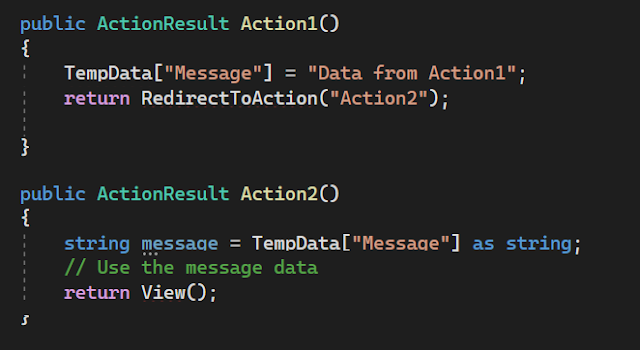
Can you give an example of using TempData to pass data between actions?

Sure! Here's an example:


In this example, TempData is used to pass the message from Action1 to Action2 through a redirect.


Can you explain the lifespan or duration of ViewBag, ViewData, and TempData?

ViewBag and ViewData are short-lived and exist only for the current request. They are not persisted across subsequent requests. TempData, on the other hand, persists data for the duration of the current request and the subsequent redirect request.


What happens if you try to access TempData in a different action without redirecting?

If you try to access TempData in a different action without redirecting, the data stored in TempData will not be available. TempData is cleared automatically after it is accessed or at the end of the current request.


Can you pass complex objects using ViewBag, ViewData, or TempData?

ViewBag and ViewData allow you to pass complex objects, but you need to cast them appropriately in the view. TempData, however, only supports passing simple objects. If you need to pass complex objects through redirects, it is recommended to use other techniques like query parameters, session state, or database storage.


What is the recommended way to pass data from the controller to the view in ASP.NET MVC?

The recommended way to pass data from the controller to the view in ASP.NET MVC is to use strongly-typed models. By defining a model class and passing an instance of that model to the view, you can have strong typing, compile-time checking, and improved code readability. ViewBag, ViewData, and TempData are considered less preferable compared to strongly-typed models.


How does TempData handle multiple redirects in ASP.NET MVC?

TempData is designed to persist data across redirects until it is accessed. If there are multiple redirects in a sequence, TempData will preserve the data until it is read in one of the actions. Once accessed, the data is marked for deletion, and subsequent redirects will not have access to that data.


Can you provide an example of using ViewData in ASP.NET MVC?

Here's an example of using ViewData to pass data from the controller to the view:


In the corresponding view, you can access the data using the ViewData dictionary:


What are the advantages of using strongly-typed models over ViewBag and ViewData?

Strongly-typed models provide compile-time checking, type safety, and improved code readability. They allow you to access data using strongly-typed properties in the view, reducing the risk of runtime errors. With ViewBag and ViewData, you need to rely on dynamic typing and string keys, which can be error-prone.


Can you explain the role of ViewDataDictionary in ASP.NET MVC?

ViewDataDictionary is a dictionary-like object that contains data used to communicate between the controller and the view. It is the underlying implementation of both ViewBag and ViewData. It provides a way to store and retrieve data using string keys.


How can you maintain data across multiple requests without using TempData?

If you want to maintain data across multiple requests without using TempData, you can consider using session state or storing the data in a persistent storage medium such as a database or cookies. Session state allows you to store data on the server and associate it with a user's session, while persistent storage options provide long-term data persistence.


Can TempData be used to pass data between different controllers?

Yes, TempData can be used to pass data between different controllers. TempData uses the session state mechanism to store data, so as long as the controllers are part of the same session, TempData can be accessed and used to pass data between them.


Is it possible to share data between partial views using ViewBag or ViewData?

Yes, you can share data between partial views using ViewBag or ViewData. Since ViewBag and ViewData are available in the parent view as well as partial views, you can set data in the parent view's controller and access it in the partial view or vice versa.


What are some alternatives to ViewBag, ViewData, and TempData?

Some alternatives to ViewBag, ViewData, and TempData include using strongly-typed models, using session state, passing data through query parameters or form inputs, using cookies, or storing data in a database. The choice of the alternative depends on the specific requirements and context of your application.


Can you use TempData to pass data between different action methods within the same controller?

Yes, TempData can be used to pass data between different action methods within the same controller. TempData persists data for the duration of the current request and the subsequent redirect request, allowing you to pass data between different actions in the same controller.


.NET Core MVC Interview questions related to Session, Cookies, and Query String


Session:

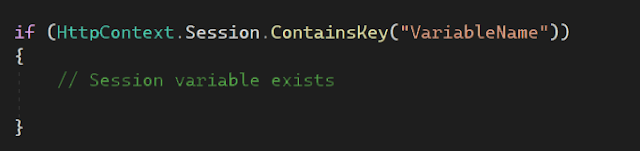
How can you check if a session variable exists?

You can use the `ContainsKey` method of the `HttpContext.Session` property to check if a session variable exists. It returns a boolean value indicating whether the session variable exists or not.


How can you set an expiration time for a session?

You can set the expiration time for a session by using the `SetInt32` or `SetString` method of the `HttpContext.Session` property along with a `TimeSpan` representing the desired expiration duration.


Cookies:

How can you set a cookie with an expiration date in ASP.NET Core?

You can set a cookie with an expiration date by setting the `Expires` property of the `CookieOptions` object.


How can you read all cookies sent by the client in ASP.NET Core?

You can access all the cookies sent by the client using the `Request.Cookies` property, which returns a `Dictionary<string, string>` representing the cookies.


Query String:

How can you get the value of a specific query string parameter from the current URL?

You can use the `Request.Query` property to retrieve the value of a specific query string parameter by its key.


How can you check if a query string parameter exists in the current URL?

You can use the `ContainsKey` method of the `Request.Query` property to check if a query string parameter exists.


How can you retrieve all query string parameters from the current URL?

You can iterate over the `Request.Query` collection to retrieve all query string parameters and their values.


How can you add a new query string parameter to a URL?

You can use the `UriBuilder` class to construct a new URL with the desired query string parameter appended.


How can you modify an existing query string parameter in a URL?

You can use the `UriBuilder` class to modify an existing query string parameter in a URL.


How can you remove a query string parameter from a URL?

You can use the `UriBuilder` class to remove a query string parameter from a URL.


Session:

What is session state in ASP.NET Core?

Session state refers to storing and retrieving user-specific data across multiple requests within a session.


How can you enable session state in ASP.NET Core?

Session state can be enabled by calling the `AddSession` method in the `ConfigureServices` method of the `Startup` class.


How is session data stored in ASP.NET Core?

Session data can be stored in-memory, out-of-process (using distributed cache), or using a database.


How can you access session data in a controller?

Session data can be accessed in a controller using the `HttpContext.Session` property.


How can you store data in session within a controller?

Data can be stored in session using the `Set` method of the `HttpContext.Session` property.


How do you retrieve data from session within a controller?

Data can be retrieved from session using the `Get` method of the `HttpContext.Session` property.


How can you remove data from session within a controller?

Data can be removed from session using the `Remove` method of the `HttpContext.Session` property.


How do you clear all session data?

You can clear all session data using the `Clear` method of the `HttpContext.Session` property.


Can you explain how session data is managed in a web farm or load-balanced environment?

In a web farm or load-balanced environment, session data can be stored in a distributed cache or a database to ensure data consistency across different servers.


Can you customize the session timeout value?

Yes, you can customize the session timeout value by setting the `IdleTimeout` property of the session options in the `ConfigureServices` method.


Cookies:

What is a cookie?

A cookie is a small piece of data that is sent from a website and stored on the user's device.


How can you create a cookie in ASP.NET Core?

You can create a cookie using the `Response.Cookies.Append` method in the controller.


How can you read a cookie in ASP.NET Core?

You can read a cookie using the `Request.Cookies` property in the controller.


How can you update a cookie in ASP.NET Core?

To update a cookie, you can set a new value using the `Response.Cookies.Append` method with the same cookie name.


How can you delete a cookie in ASP.NET Core?

You can delete a cookie by setting its expiration date in the past using the `Response.Cookies.Delete` method.


Can you explain the difference between session and cookies?

Session data is stored on the server and associated with a user's session, while cookies are stored on the client-side. Session data is more secure as it is not exposed to the client.


Can you configure cookie options in ASP.NET Core?

Yes, cookie options can be configured in the `ConfigureServices` method by using the `services.Configure<CookiePolicyOptions>` method.


What is the maximum size of a cookie in ASP.NET Core?

The maximum size of a cookie in ASP.NET Core is 4KB.


Can you encrypt the cookie data?

Yes, you can encrypt the cookie data by using the `IDataProtector` interface to protect and unprotect the cookie.


Can you explain the purpose of the `SameSite` attribute in cookies?

The `SameSite` attribute determines whether cookies should be sent with cross-site requests. It can have three values: `None`, `Lax`, or `Strict`.


Query String:

What is a query string?

A query string is a part of a URL that contains data in the form of key-value pairs, appended after the `?` symbol.


How can you retrieve query string values in ASP.NET Core?

Query string values can be retrieved using the `Request.Query` property in a controller.


Can you modify query string values in ASP.NET Core?

Yes, you can modify query string values by using the `UriBuilder` class to build a new URL with the desired query string parameters.


How can you validate and bind query string parameters to model properties?

You can validate and bind query string parameters to model properties by using the `[FromQuery]` attribute on the model properties in the controller action method.


Can you have multiple query string parameters with the same name?

Yes, multiple query string parameters with the same name can be included in the URL. They will be accessible as an array using the `Request.Query` property.


Can you encrypt query string parameters?

Yes, you can encrypt query string parameters to enhance security and prevent tampering. One approach is to encrypt the values using a cryptographic algorithm before appending them to the URL.


How can you pass sensitive data through query strings securely?

It is generally recommended not to pass sensitive data through query strings as they can be easily visible and tampered with. Instead, use other methods such as form submission or encrypted communication.


Can you explain the URL encoding of query string parameters?

Query string parameters are URL-encoded to ensure proper transmission of special characters. For example, spaces are replaced with `%20`, and special characters are replaced with their corresponding URL-encoded representation.


How do you handle optional query string parameters?

Optional query string parameters can be handled by specifying default values for the corresponding method parameters in the controller action method.


Can you provide an example of constructing a URL with query string parameters?