Search

Drop Down MenusCSS Drop Down MenuPure CSS Dropdown Menu

Tuesday, July 18, 2023

C# Collection Best practices and tips to keep in mind

Dotnet Training in Tamil

Best practices and tips to keep in mind:

Use the appropriate collection type: Choose the collection type that best suits your needs based on the specific requirements of your application. For example, use ArrayList for a dynamically resizable array, Hashtable for a collection of key-value pairs, or LinkedList for efficient insertion and removal operations.


Specify the collection type explicitly: When declaring and working with non-generic collections, it's a good practice to explicitly specify the collection type. For example, instead of using the non-generic `ArrayList`, use the generic `List<T>` with the appropriate type parameter.


Avoid mixing types in collections: Non-generic collections like ArrayList allow storing elements of different types. However, it's generally recommended to avoid mixing types within a collection to maintain type safety and clarity in your code.


Use the appropriate methods and properties: Each non-generic collection provides specific methods and properties tailored to its functionality. Familiarize yourself with the available methods and use them appropriately. For example, use `Add` to add elements, `Remove` to remove elements, and `Count` to get the number of elements.


Be cautious of boxing and unboxing: Non-generic collections store elements as objects, which can lead to boxing and unboxing operations when working with value types. Be aware of the performance implications of boxing and unboxing, and consider using generic collections when working with value types to avoid these operations.


Prefer generic collections when possible: Whenever possible, use the generic versions of collections (such as `List<T>`, `Dictionary<TKey, TValue>`, etc.) instead of their non-generic counterparts. Generic collections provide better type safety, improved performance, and avoid the need for casting or boxing/unboxing.


Consider using collection initializers: Collection initializers provide a concise syntax for initializing collection objects with a set of elements. Take advantage of collection initializers to simplify the code when adding elements to non-generic collections.


Ensure thread safety if required: Non-generic collections are not inherently thread-safe. If you need to access a collection from multiple threads concurrently, consider using thread-safe techniques like locking or using concurrent collections (available in the `System.Collections.Concurrent` namespace).


Dispose of IDisposable collections: Some non-generic collections, such as `Hashtable`, may implement the `IDisposable` interface. If you use such collections and they are no longer needed, make sure to dispose of them properly to release any resources they may hold.


Follow naming conventions: When naming your collection variables or types, follow the naming conventions recommended by the C# programming guidelines. Use meaningful and descriptive names to enhance code readability and maintainability.

By following these best practices and tips, you can effectively work with non-generic collections in C# and write clean, maintainable code. However, it's generally recommended to use generic collections whenever possible to take advantage of their type safety, improved performance, and better code readability.


Naming conventions for collections

Use plural names: Use plural names for collection variables to indicate that they represent multiple elements. For example, use `customers` instead of `customer` for a collection of customer objects.


Use descriptive names: Choose meaningful and descriptive names that accurately represent the purpose or content of the collection. Avoid using generic names like `list` or `collection` unless they are appropriate in the context.


Avoid type-specific names: Avoid including the type name in the collection variable name. For example, instead of naming a collection of strings as `stringList`, simply use `names` or a more descriptive name related to the specific purpose of the collection.


Prefer specific collection names: If possible, use more specific collection names that indicate the purpose or usage of the collection. For example, use `orderItems` instead of `items` if the collection represents order items.


Use camelCase: Use camelCase for naming collection variables, starting with a lowercase letter. For example, use `userList` instead of `UserList` or `user_list`.


Avoid Hungarian notation: Avoid using Hungarian notation or prefixes to indicate the collection type, such as `lst`, `arr`, or `dict`. The type information should be clear from the variable declaration and context.


Be consistent: Maintain consistency in naming conventions throughout your codebase. If you follow a specific naming convention for collections, stick to it consistently across your code.


More Questions

Best Dotnet Training in Tamil

Best Dotnet Training in Tamil


Friday, July 14, 2023

😍 𝐅𝐫𝐞𝐞!! 𝐀𝐖𝐒 Certificates && Free 𝐓𝐫𝐚𝐢𝐧𝐢𝐧𝐠 𝐜𝐨𝐮𝐫𝐬𝐞𝐬 & 𝐅𝐫𝐞𝐞 𝐁𝐚𝐝𝐠𝐞𝐬

 Free AWS Training Courses with Badge Assessments and How to Enroll

Investing in yourself is one of the most valuable things you can do. To help you enhance your skills and knowledge in cloud computing,  Here list of free AWS training courses that not only provide valuable content but also offer assessments and digital badges upon completion. In this article, you will find the details of each course and the enrollment process for obtaining these prestigious badges. Let's dive in!

Free AWS Training Courses with Badge Assessments and How to Enroll

Cloud Essentials:

Free Certificate Courses - Grow Your Professional Network

The Cloud Essentials course serves as a foundational introduction to AWS cloud computing. It covers essential concepts, terminology, and services. By enrolling in this course and successfully completing the assessment, you will earn a digital badge recognizing your understanding of AWS cloud essentials. 

Free ENROLL

Media & Entertainment:

The Media & Entertainment course focuses on AWS services and solutions tailored specifically for the media and entertainment industry. By completing this course and passing the associated assessment, you will receive a digital badge highlighting your expertise in utilizing AWS for media and entertainment purposes.

Free Enroll

3. Architecting:

😍 𝐅𝐫𝐞𝐞 𝐀𝐖𝐒 𝐓𝐫𝐚𝐢𝐧𝐢𝐧𝐠 𝐜𝐨𝐮𝐫𝐬𝐞𝐬 & 𝐅𝐫𝐞𝐞 𝐁𝐚𝐝𝐠𝐞𝐬!

For those interested in architecting solutions on AWS, the Architecting course provides comprehensive knowledge and best practices. By successfully completing the assessment, you will earn a digital badge showcasing your proficiency in designing and deploying scalable and reliable AWS architectures.

Free Enroll

4. AWS for Games:

😍 𝐅𝐫𝐞𝐞 𝐀𝐖𝐒 𝐓𝐫𝐚𝐢𝐧𝐢𝐧𝐠 𝐜𝐨𝐮𝐫𝐬𝐞𝐬 & 𝐅𝐫𝐞𝐞 𝐁𝐚𝐝𝐠𝐞𝐬!

The AWS for Games course delves into leveraging AWS services for game development and deployment. By enrolling in this course and passing the assessment, you will earn a digital badge certifying your skills in utilizing AWS technologies to create and manage game environments.

Free Enroll

5. Serverless:

😍 𝐅𝐫𝐞𝐞 𝐀𝐖𝐒 𝐓𝐫𝐚𝐢𝐧𝐢𝐧𝐠 𝐜𝐨𝐮𝐫𝐬𝐞𝐬 & 𝐅𝐫𝐞𝐞 𝐁𝐚𝐝𝐠𝐞𝐬!

The Serverless course focuses on serverless architecture using AWS Lambda and related services. By successfully completing the assessment, you will receive a digital badge highlighting your expertise in building serverless applications and systems on the AWS platform.

Free Enroll

6. Object Storage:

The Object Storage course explores AWS services like Amazon S3 for scalable and durable storage solutions. Upon passing the associated assessment, you will earn a digital badge acknowledging your proficiency in managing object storage using AWS services.

Free Enroll

7. Block Storage:


The Block Storage course covers AWS services such as Amazon EBS for block-level storage in the cloud. By completing the assessment, you will receive a digital badge certifying your understanding of AWS block storage and its applications.

Free Enroll

8. File Storage:

The File Storage course focuses on AWS file storage services like Amazon EFS for scalable and shared file systems. By successfully passing the assessment, you will earn a digital badge recognizing your expertise in utilizing AWS file storage solutions.

Free Enroll

9. Storage Data Migration:

The Storage Data Migration course delves into AWS services and best practices for efficiently migrating data to and from AWS storage solutions. Upon completing the assessment, you will receive a digital badge highlighting your proficiency in storage data migration on the AWS platform.

Free Enroll

10. Data Protection & Disaster Recovery:


The Data Protection & Disaster Recovery course explores AWS services and strategies for safeguarding data and implementing effective disaster recovery measures. By successfully completing the assessment, you will earn a digital badge certifying your expertise in data protection and disaster recovery using AWS services.

Free Enroll

Conclusion:

Investing in your skills and knowledge is crucial in the rapidly evolving world of cloud computing. These free AWS training courses with badge assessments offer you a valuable opportunity to enhance your expertise and showcase your achievements. By following the provided links, you can easily enroll in each course and gain the knowledge necessary to excel in AWS cloud services. Remember, the best investment you can make is in yourself!

😍 𝐅𝐫𝐞𝐞!! 𝐀𝐖𝐒  Certificates && Free 𝐓𝐫𝐚𝐢𝐧𝐢𝐧𝐠 𝐜𝐨𝐮𝐫𝐬𝐞𝐬 & 𝐅𝐫𝐞𝐞 𝐁𝐚𝐝𝐠𝐞𝐬


Monday, July 10, 2023

Interview questions and answers related to ASP.NET Core, Razor views, controllers, layouts, and C# code within HTML

Interview questions and answers related to ASP.NET Core, Razor views, controllers, layouts, and C# code within HTML:


What is ASP.NET Core?

ASP.NET Core is an open-source, cross-platform framework for building modern web applications. It enables developers to create web applications and services that can run on Windows, macOS, or Linux.


What is Razor view in ASP.NET Core?

Razor view is a markup syntax used to combine server-side C# code with HTML to generate dynamic web pages. Razor views allow developers to write clean and readable code by seamlessly integrating C# code within HTML markup.


What is a controller in ASP.NET Core?

A controller in ASP.NET Core is responsible for handling incoming HTTP requests and generating appropriate responses. It processes user actions, interacts with models and databases, and returns views or data to the client.


What is a layout in Razor views?

A layout in Razor views provides a consistent structure and design for multiple views. It defines the common HTML elements, such as header, footer, navigation, etc., that are shared across different pages. Layouts allow developers to maintain a consistent user interface throughout the application.


How do you pass data from a controller to a view?

Data can be passed from a controller to a view in ASP.NET Core using the ViewBag, ViewData, or strongly-typed models. ViewBag and ViewData are dynamic objects that allow you to store and retrieve data, while strongly-typed models provide a type-safe approach by defining model classes and passing them to views.


How do you create a new Razor view in ASP.NET Core?

To create a new Razor view, you can right-click on the desired folder in Visual Studio or your preferred code editor, select "Add," and then choose "View." Specify the view name, select the desired template (empty, list, create, etc.), and click "Add."


How can you use C# code within HTML markup in Razor views?

You can use C# code within HTML markup in Razor views by enclosing the code within `@{ }` or by using the `@` symbol for inline expressions. For example:


What is the purpose of the @model directive in Razor views?

The `@model` directive in Razor views is used to specify the type of the model being passed to the view. It allows you to use strongly-typed models within the view, providing IntelliSense support and compile-time type checking.


How do you create a new controller in ASP.NET Core?

To create a new controller in ASP.NET Core, right-click on the desired folder in Visual Studio or your preferred code editor, select "Add," and then choose "Controller." Specify the controller name, select the desired template (empty, API, etc.), and click "Add."


How do you specify a layout for a Razor view?

To specify a layout for a Razor view, you can use the `@layout` directive at the top of the view file. For example:


This specifies the layout file `_Layout.cshtml` located in the `Views/Shared` folder.

These questions cover some fundamental concepts of ASP.NET Core, Razor views, controllers, layouts, and using C# code within HTML. It's always a good idea to study further and explore additional resources to deepen your understanding of these topics.


What is a Layout in Razor Views?

 A Layout in Razor Views is a shared template that defines the common structure and design of multiple web pages in an application. It contains the common HTML structure, header, footer, and other elements that remain consistent across multiple pages. Views can specify a Layout to inherit from, allowing them to provide content within the defined structure.


How can you pass data from a Controller to a View in ASP.NET Core?

Data can be passed from a Controller to a View in ASP.NET Core using ViewBag, ViewData, or strongly-typed models. ViewBag and ViewData are dynamic objects that allow you to store and retrieve data within the Controller and access it in the corresponding View. Strongly-typed models involve creating a custom class to represent the data and passing an instance of that class to the View.


What is the role of the @ symbol in Razor Views?

In Razor Views, the @ symbol is used to switch between HTML markup and C# code. It allows developers to embed C# code within the HTML markup and vice versa. For example, @Model.PropertyName is used to display a property value from the model, and @{ ... } is used to enclose a block of C# code.


How can you include C# code in HTML markup in Razor Views?

C# code can be included in HTML markup in Razor Views using the @ symbol. For example, you can use @if, @foreach, @switch, or @Html helper methods to write conditional statements, loops, and generate dynamic content.


How can you use C# code to generate HTML elements dynamically in Razor Views?

You can use C# code in Razor Views to dynamically generate HTML elements by using loops, conditional statements, and HTML helpers. For example, you can use a foreach loop to iterate over a collection and generate HTML elements dynamically based on the data.

ASP.NET MVC Interview questions and answers related to ViewBag, ViewData, and TempData


What is ViewBag in ASP.NET MVC?

ViewBag is a dynamic property that is part of the ViewData dictionary and is used to pass data from the controller to the view. It is a dynamic wrapper around the ViewData dictionary that allows you to set properties and access them in the view.


How is ViewBag different from ViewData?

ViewBag and ViewData are similar in that they are used to pass data from the controller to the view, but they have some differences. ViewData is a dictionary object that can be used to store and retrieve data using a string key. ViewBag, on the other hand, is a dynamic property that provides a more concise syntax for accessing the ViewData dictionary.


How can you pass data using ViewBag in the controller?

In the controller, you can assign values to properties of the ViewBag object. For example:


How can you access data passed through ViewBag in the view?

In the view, you can access data passed through ViewBag using the property syntax. For example, to display the message set in the previous example:


What is TempData in ASP.NET MVC?

TempData is another dictionary-like object used to pass data between controllers and redirects. It is similar to ViewBag and ViewData but is specifically designed to persist data across redirects.


How is TempData different from ViewBag and ViewData?

A6: TempData is similar to ViewBag and ViewData in that it allows you to pass data from the controller to the view. However, TempData is specifically designed to persist data across redirects. It is typically used to store temporary data that needs to be available across multiple requests.


How can you pass data using TempData in the controller?

In the controller, you can assign values to properties of the TempData object. For example:


How can you access data passed through TempData in another action?

In another action, you can access the data passed through TempData using the same key that was used to set it. For example:


What happens to TempData data after it is accessed?

TempData is designed to store data temporarily and is cleared automatically after it is accessed. When you access TempData in an action, the data is read, and the entry is marked for deletion. The data will be available until the end of the current request or until it is accessed in another action.


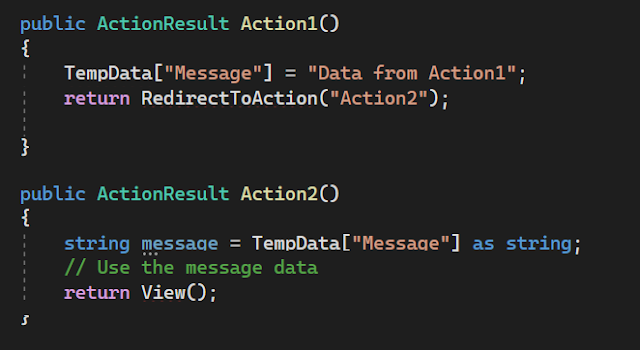
Can you give an example of using TempData to pass data between actions?

Sure! Here's an example:


In this example, TempData is used to pass the message from Action1 to Action2 through a redirect.


Can you explain the lifespan or duration of ViewBag, ViewData, and TempData?

ViewBag and ViewData are short-lived and exist only for the current request. They are not persisted across subsequent requests. TempData, on the other hand, persists data for the duration of the current request and the subsequent redirect request.


What happens if you try to access TempData in a different action without redirecting?

If you try to access TempData in a different action without redirecting, the data stored in TempData will not be available. TempData is cleared automatically after it is accessed or at the end of the current request.


Can you pass complex objects using ViewBag, ViewData, or TempData?

ViewBag and ViewData allow you to pass complex objects, but you need to cast them appropriately in the view. TempData, however, only supports passing simple objects. If you need to pass complex objects through redirects, it is recommended to use other techniques like query parameters, session state, or database storage.


What is the recommended way to pass data from the controller to the view in ASP.NET MVC?

The recommended way to pass data from the controller to the view in ASP.NET MVC is to use strongly-typed models. By defining a model class and passing an instance of that model to the view, you can have strong typing, compile-time checking, and improved code readability. ViewBag, ViewData, and TempData are considered less preferable compared to strongly-typed models.


How does TempData handle multiple redirects in ASP.NET MVC?

TempData is designed to persist data across redirects until it is accessed. If there are multiple redirects in a sequence, TempData will preserve the data until it is read in one of the actions. Once accessed, the data is marked for deletion, and subsequent redirects will not have access to that data.


Can you provide an example of using ViewData in ASP.NET MVC?

Here's an example of using ViewData to pass data from the controller to the view:


In the corresponding view, you can access the data using the ViewData dictionary:


What are the advantages of using strongly-typed models over ViewBag and ViewData?

Strongly-typed models provide compile-time checking, type safety, and improved code readability. They allow you to access data using strongly-typed properties in the view, reducing the risk of runtime errors. With ViewBag and ViewData, you need to rely on dynamic typing and string keys, which can be error-prone.


Can you explain the role of ViewDataDictionary in ASP.NET MVC?

ViewDataDictionary is a dictionary-like object that contains data used to communicate between the controller and the view. It is the underlying implementation of both ViewBag and ViewData. It provides a way to store and retrieve data using string keys.


How can you maintain data across multiple requests without using TempData?

If you want to maintain data across multiple requests without using TempData, you can consider using session state or storing the data in a persistent storage medium such as a database or cookies. Session state allows you to store data on the server and associate it with a user's session, while persistent storage options provide long-term data persistence.


Can TempData be used to pass data between different controllers?

Yes, TempData can be used to pass data between different controllers. TempData uses the session state mechanism to store data, so as long as the controllers are part of the same session, TempData can be accessed and used to pass data between them.


Is it possible to share data between partial views using ViewBag or ViewData?

Yes, you can share data between partial views using ViewBag or ViewData. Since ViewBag and ViewData are available in the parent view as well as partial views, you can set data in the parent view's controller and access it in the partial view or vice versa.


What are some alternatives to ViewBag, ViewData, and TempData?

Some alternatives to ViewBag, ViewData, and TempData include using strongly-typed models, using session state, passing data through query parameters or form inputs, using cookies, or storing data in a database. The choice of the alternative depends on the specific requirements and context of your application.


Can you use TempData to pass data between different action methods within the same controller?

Yes, TempData can be used to pass data between different action methods within the same controller. TempData persists data for the duration of the current request and the subsequent redirect request, allowing you to pass data between different actions in the same controller.


.NET Core MVC Interview questions related to Session, Cookies, and Query String


Session:

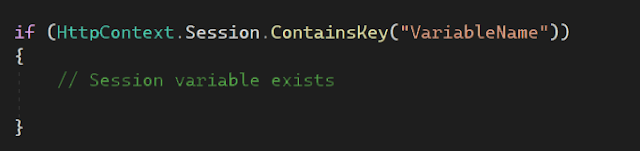
How can you check if a session variable exists?

You can use the `ContainsKey` method of the `HttpContext.Session` property to check if a session variable exists. It returns a boolean value indicating whether the session variable exists or not.


How can you set an expiration time for a session?

You can set the expiration time for a session by using the `SetInt32` or `SetString` method of the `HttpContext.Session` property along with a `TimeSpan` representing the desired expiration duration.


Cookies:

How can you set a cookie with an expiration date in ASP.NET Core?

You can set a cookie with an expiration date by setting the `Expires` property of the `CookieOptions` object.


How can you read all cookies sent by the client in ASP.NET Core?

You can access all the cookies sent by the client using the `Request.Cookies` property, which returns a `Dictionary<string, string>` representing the cookies.


Query String:

How can you get the value of a specific query string parameter from the current URL?

You can use the `Request.Query` property to retrieve the value of a specific query string parameter by its key.


How can you check if a query string parameter exists in the current URL?

You can use the `ContainsKey` method of the `Request.Query` property to check if a query string parameter exists.


How can you retrieve all query string parameters from the current URL?

You can iterate over the `Request.Query` collection to retrieve all query string parameters and their values.


How can you add a new query string parameter to a URL?

You can use the `UriBuilder` class to construct a new URL with the desired query string parameter appended.


How can you modify an existing query string parameter in a URL?

You can use the `UriBuilder` class to modify an existing query string parameter in a URL.


How can you remove a query string parameter from a URL?

You can use the `UriBuilder` class to remove a query string parameter from a URL.


Session:

What is session state in ASP.NET Core?

Session state refers to storing and retrieving user-specific data across multiple requests within a session.


How can you enable session state in ASP.NET Core?

Session state can be enabled by calling the `AddSession` method in the `ConfigureServices` method of the `Startup` class.


How is session data stored in ASP.NET Core?

Session data can be stored in-memory, out-of-process (using distributed cache), or using a database.


How can you access session data in a controller?

Session data can be accessed in a controller using the `HttpContext.Session` property.


How can you store data in session within a controller?

Data can be stored in session using the `Set` method of the `HttpContext.Session` property.


How do you retrieve data from session within a controller?

Data can be retrieved from session using the `Get` method of the `HttpContext.Session` property.


How can you remove data from session within a controller?

Data can be removed from session using the `Remove` method of the `HttpContext.Session` property.


How do you clear all session data?

You can clear all session data using the `Clear` method of the `HttpContext.Session` property.


Can you explain how session data is managed in a web farm or load-balanced environment?

In a web farm or load-balanced environment, session data can be stored in a distributed cache or a database to ensure data consistency across different servers.


Can you customize the session timeout value?

Yes, you can customize the session timeout value by setting the `IdleTimeout` property of the session options in the `ConfigureServices` method.


Cookies:

What is a cookie?

A cookie is a small piece of data that is sent from a website and stored on the user's device.


How can you create a cookie in ASP.NET Core?

You can create a cookie using the `Response.Cookies.Append` method in the controller.


How can you read a cookie in ASP.NET Core?

You can read a cookie using the `Request.Cookies` property in the controller.


How can you update a cookie in ASP.NET Core?

To update a cookie, you can set a new value using the `Response.Cookies.Append` method with the same cookie name.


How can you delete a cookie in ASP.NET Core?

You can delete a cookie by setting its expiration date in the past using the `Response.Cookies.Delete` method.


Can you explain the difference between session and cookies?

Session data is stored on the server and associated with a user's session, while cookies are stored on the client-side. Session data is more secure as it is not exposed to the client.


Can you configure cookie options in ASP.NET Core?

Yes, cookie options can be configured in the `ConfigureServices` method by using the `services.Configure<CookiePolicyOptions>` method.


What is the maximum size of a cookie in ASP.NET Core?

The maximum size of a cookie in ASP.NET Core is 4KB.


Can you encrypt the cookie data?

Yes, you can encrypt the cookie data by using the `IDataProtector` interface to protect and unprotect the cookie.


Can you explain the purpose of the `SameSite` attribute in cookies?

The `SameSite` attribute determines whether cookies should be sent with cross-site requests. It can have three values: `None`, `Lax`, or `Strict`.


Query String:

What is a query string?

A query string is a part of a URL that contains data in the form of key-value pairs, appended after the `?` symbol.


How can you retrieve query string values in ASP.NET Core?

Query string values can be retrieved using the `Request.Query` property in a controller.


Can you modify query string values in ASP.NET Core?

Yes, you can modify query string values by using the `UriBuilder` class to build a new URL with the desired query string parameters.


How can you validate and bind query string parameters to model properties?

You can validate and bind query string parameters to model properties by using the `[FromQuery]` attribute on the model properties in the controller action method.


Can you have multiple query string parameters with the same name?

Yes, multiple query string parameters with the same name can be included in the URL. They will be accessible as an array using the `Request.Query` property.


Can you encrypt query string parameters?

Yes, you can encrypt query string parameters to enhance security and prevent tampering. One approach is to encrypt the values using a cryptographic algorithm before appending them to the URL.


How can you pass sensitive data through query strings securely?

It is generally recommended not to pass sensitive data through query strings as they can be easily visible and tampered with. Instead, use other methods such as form submission or encrypted communication.


Can you explain the URL encoding of query string parameters?

Query string parameters are URL-encoded to ensure proper transmission of special characters. For example, spaces are replaced with `%20`, and special characters are replaced with their corresponding URL-encoded representation.


How do you handle optional query string parameters?

Optional query string parameters can be handled by specifying default values for the corresponding method parameters in the controller action method.


Can you provide an example of constructing a URL with query string parameters?


Interview questions and answers related to XAML styles | MAUI | Xamarin


What is a style in XAML?

A style in XAML is a collection of property settings that can be applied to multiple elements to provide a consistent appearance and behavior.


How can you define a style in XAML?

Styles can be defined in XAML using the `<Style>` element, which contains a collection of property setters defining the visual and behavioral properties for the target elements.


What is the difference between inline styles and resource styles in XAML?

Inline styles are directly applied to individual elements using the `Style` property, while resource styles are defined once and can be reused by multiple elements using resource references.


How can you apply a style to an element in XAML?

Styles can be applied to elements by setting the `Style` property of the target element to a style reference. For example: 

`<Button Style="{StaticResource MyButtonStyle}" />`.


What is the purpose of the "BasedOn" property in XAML styles?

The "BasedOn" property allows you to create a new style based on an existing style. The new style inherits the settings of the base style and can override or add additional property setters.


How do you specify a base style for a new style in XAML?

To specify a base style, you use the "BasedOn" property within the `<Style>` element and set it to the key of the base style. For example:

 `<Style TargetType="Button" BasedOn="{StaticResource BaseButtonStyle}">`.


What is a static resource in XAML?

A static resource is a reusable XAML object that can be defined once and referenced multiple times throughout an application. It is resolved at compile-time.


How do you define a static resource in XAML?

Static resources are defined in XAML using the `<StaticResource>` markup extension, which assigns a key to the resource. For example: 

`<SolidColorBrush x:Key="MyBrush" Color="Red" />`.


How can you reference a static resource in XAML?

To reference a static resource, you use the `{StaticResource}` markup extension and provide the key of the resource. For example:

 `<Button Background="{StaticResource MyBrush}" />`.


What is a dynamic resource in XAML?

A dynamic resource is a resource that can change at runtime. It allows for dynamic updates to elements that reference the resource, reflecting the new resource value.


What is the difference between a dynamic resource and a static resource in XAML?

A static resource is resolved at compile-time and its value is set once, while a dynamic resource is resolved at runtime and can be changed dynamically, allowing for updates to elements that reference the resource.


How do you define a dynamic resource in XAML?

Dynamic resources are defined in XAML using the `<DynamicResource>` markup extension, which assigns a key to the resource. For example: 

`<SolidColorBrush x:Key="MyBrush" Color="Red" />`.


How can you reference a dynamic resource in XAML?

To reference a dynamic resource, you use the `{DynamicResource}` markup extension and provide the key of the resource. For example:

 `<Button Background="{DynamicResource MyBrush}" />`.


Can you apply multiple styles to a single element in XAML?

Yes, you can apply multiple styles to an element by using the `BasedOn` property. Each subsequent style can be based on the previous style, allowing for a cascade of styles.


What is a key in XAML styles and resources?

A key is a unique identifier assigned to a style or resource in XAML. It is used to reference and retrieve the corresponding style or resource.


Can you change the style of an element dynamically at runtime?

Yes, you can change the style of an element dynamically at runtime by modifying its `Style` property and assigning it a new style reference.


How can you set the default style for a control in XAML?

You can set the default style for a control by adding a `Style` without an `x:Key` to the `Application.Resources` section. The control will automatically apply that style as its default.


What is the role of the `Style.Triggers` property in XAML?

The `Style.Triggers` property allows you to define a set of conditions that, when met, will modify the appearance or behavior of the element associated with the style.


Can you define a style in XAML that targets multiple control types?

Yes, you can use the `TargetType` property to define a style that targets multiple control types. This allows you to create a consistent appearance and behavior across multiple controls.


How can you override a style locally for a specific element in XAML?

You can override a style locally for a specific element by setting the `Style` property of the element to a new style definition directly within its XAML markup.


Can you apply a style conditionally based on a property value in XAML?

Yes, you can use the `Style.Triggers` property along with the `DataTrigger` or `Trigger` elements to apply a style conditionally based on a property value of the target element or its data context.


What is the role of the `BasedOn` property when defining a style in XAML?

The `BasedOn` property allows you to create a new style based on an existing style, inheriting the property setters, triggers, and other settings from the base style.


Can you define a style that only applies to a specific named element in XAML?

Yes, you can use the `x:Key` attribute to assign a unique key to the style and explicitly apply it to a specific named element using the `Style` property.


How can you share styles between different XAML files or controls?

You can define styles in a separate resource dictionary file and then reference that resource dictionary in multiple XAML files or controls using the `MergedDictionaries` property or the `ResourceDictionary.MergedWith` attribute.


What is the purpose of the `BasedOn` property when defining a style in XAML?

The `BasedOn` property allows you to create a new style based on an existing style, inheriting the property setters, triggers, and other settings from the base style.


Can you define styles for custom controls in XAML?

Yes, you can define styles for custom controls in XAML by specifying the `TargetType` of the style as the custom control's type and applying the style to instances of the control.


How can you override a specific property of a style for a single element in XAML?

You can override a specific property of a style for a single element by setting the property directly on the element. This will take precedence over the value specified in the style.


What is the purpose of the `Style.Resources` property in XAML?

The `Style.Resources` property allows you to define additional resources that are only available within the scope of the style. These resources can be used to provide specific visual elements or data templates for the style.


Can you create a style that applies to all controls of a specific type in XAML?

Yes, you can create a style that applies to all controls of a specific type by setting the `TargetType` property of the style to the desired control type without specifying an `x:Key` attribute.


How can you organize and manage styles in XAML?

Styles can be organized and managed in XAML by using resource dictionaries to group related styles, creating separate XAML files for different sets of styles, and using naming conventions to provide clarity and maintainability.


How can XAML styles be useful in creating a consistent user interface across an application?

XAML styles allow you to define a set of visual and behavioral properties once and apply them to multiple elements, ensuring a consistent look and feel throughout the application.


How can XAML styles help in implementing theming and skinning capabilities in an application?

By using XAML styles, you can define different styles for various elements and easily switch between them at runtime, enabling theming and skinning capabilities to change the visual appearance of the application.


Can you explain how XAML styles contribute to the maintainability of a large-scale application?

XAML styles promote code reuse and centralize the definition of visual properties, making it easier to update the appearance and behavior of multiple elements by modifying a single style declaration.


How can XAML styles be leveraged for responsive design and adapting to different screen sizes?

XAML styles can be used in combination with adaptive triggers or visual states to dynamically modify the layout, sizing, and other visual properties of elements based on the available screen space, enabling responsive design.


In a collaborative development environment, how can XAML styles facilitate teamwork and productivity?

XAML styles can be defined in separate resource dictionaries or XAML files, allowing different developers to work on different parts of the UI independently and apply consistent styles by merging the dictionaries at runtime.